BoxLang 🚀 A New JVM Dynamic Language Learn More...

See what your BoxLang application is really doing
BxLens is the free debug bar and ops console for BoxLang. Find the slow query, the N+1 loop, the failing call, the starved thread and the runaway AI agent in seconds, with built in AI observability for BoxLang AI. Everything stays on your server: no cloud, no agent to install, no data sent anywhere.
Documentation | Walkthroughs | Free and BoxLang+ | BoxLang+ plans
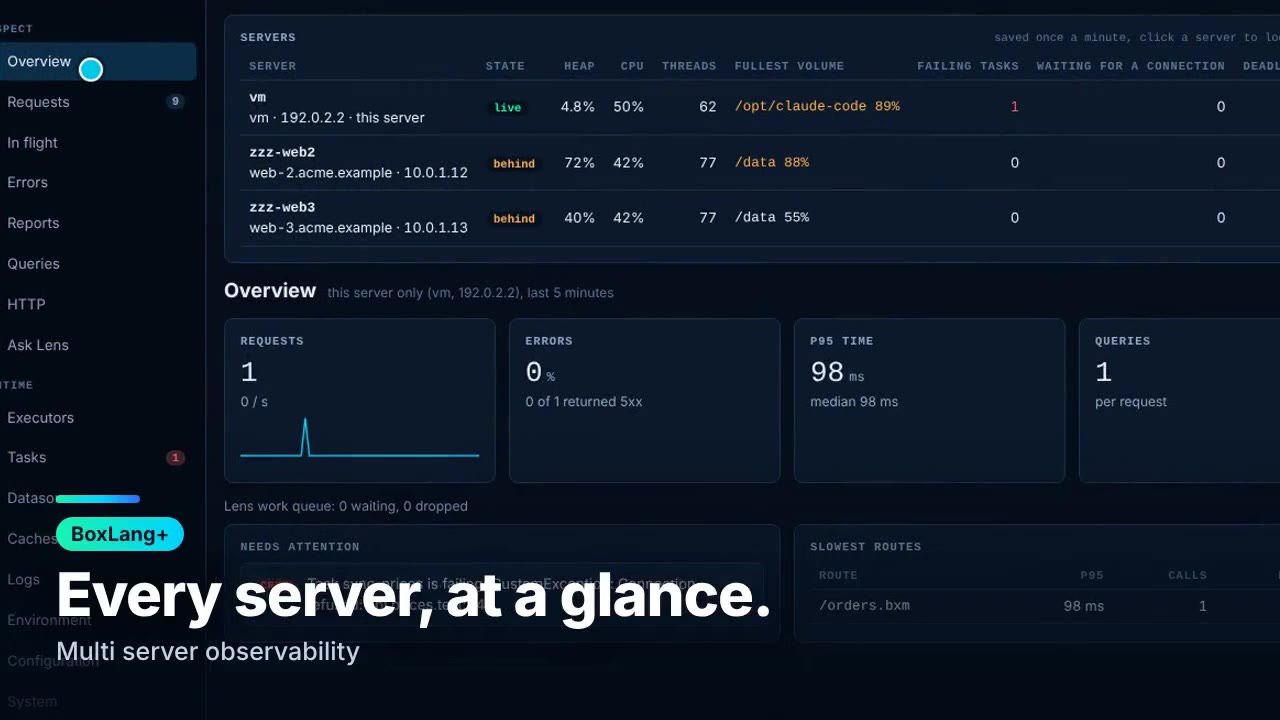
Watch the trailer on bxlens.boxlang.io.
Two minutes to your first trace
install-bx-module bx-lens # or: box install bx-lens
Turn on the bar in boxlang.json, restart, and open any
page from the same machine:
{ "modules": { "bxLens": { "settings": { "bar": { "enabled": true } } } } }
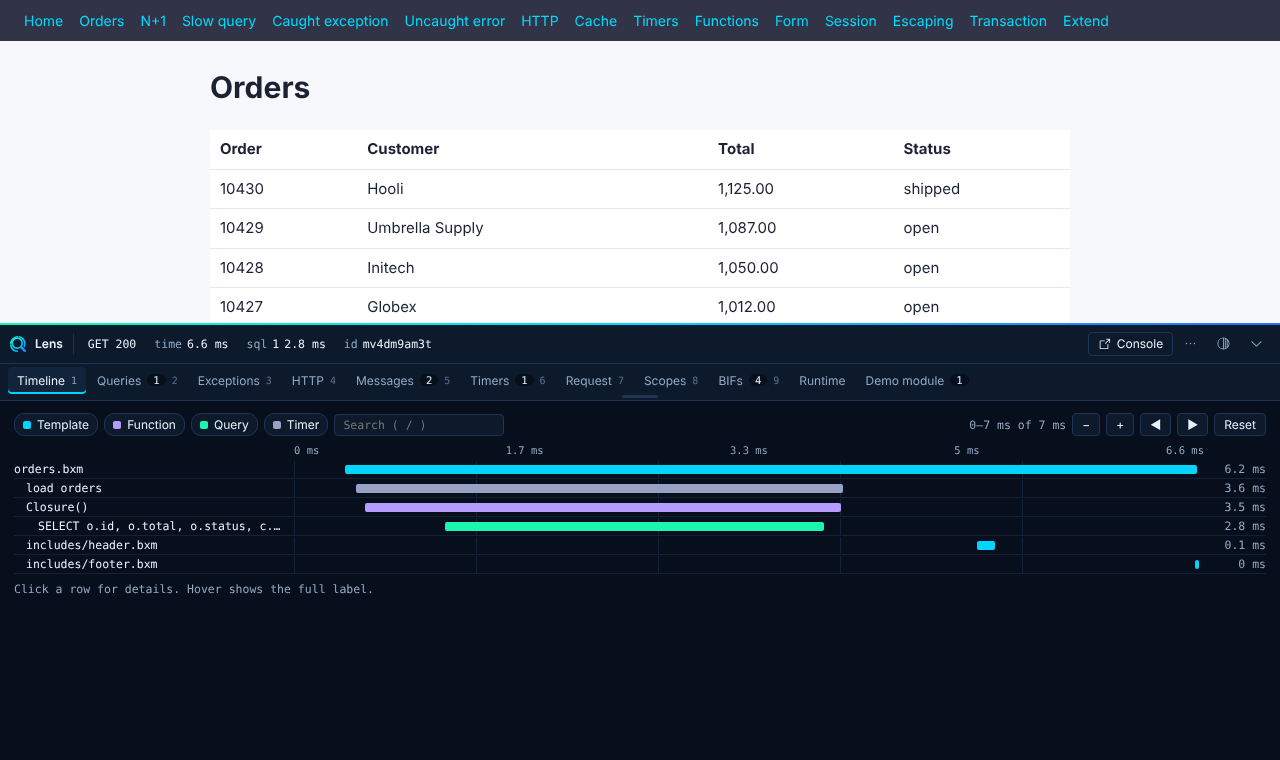
A strip appears at the bottom of every HTML page. Click it to open the timeline of the request you just made. BxLens is off by default and answers only to the local machine until you say otherwise.
Configure it in boxlang.json
Everything lives under modules.bxLens.settings. Every
setting has a default, so add only what you need. The password for the
console can also be set in the console itself the first time you open it.
The bar and the console
{
  "modules": {
    "bxLens": {
      "settings": {
        "bar":     { "enabled": true },
        "console": { "enabled": true }
      }
    }
  }
}
The console is at /~bxlens/index.bxm. Use
"password":
  "${env.BXLENS_PASSWORD}"
or a bxsecret:
value (boxlang generatesecret "your password")
to set it from config. Both the bar and the console answer to the
local machine only until you change access.
Turn on AI observability
"collectors": { "aiobs": { "enabled": true } }
Optional: "content": "preview" keeps
a redacted preview of prompts and answers, "attach":
false stops BxLens from attaching its recorder to your agents,
and "failurePct",
"rateLimits" and
"slowFactor" tune what needs attention.
Turn on Lensy, the Box Agent (BoxLang+; a local Ollama model by default, or OpenAI, Claude, Gemini and more)
"ai": { "enabled": true, "provider": "ollama", "model": "llama3.2", "baseUrl": "http://localhost:11434" }
Set the API key for a hosted provider in the console (Settings, Security) and it is kept encrypted. It never goes in the file.
Watch bx-mail
"collectors": { "mail": { "enabled": true } }
Many servers in one console (BoxLang+). The same file on each server, with its own name:
"store":   { "dir": "/mnt/shared/lens-store" },
"secrets": { "dir": "/mnt/shared/lens-secrets" },
"server":  { "name": "web-a" }
Every setting is described in the Configuration reference, with a guide for several servers and running in production.
The bar: the page you just loaded, explained
- One waterfall of templates, functions, queries, HTTP calls and transactions on a single time axis. Click a line to open the file in your editor.
- N+1 queries and slow SQL, with the rows, the time and the line of code that ran each statement.
- Exceptions with the BoxLang location and the Java stack.
-
Your own signals:
lensMessage(),lensMeasure(),lensDump()andlensPanel()add messages, timers and panels from your code. - ColdBox aware: the event, route, layout and view on every request, and a reinit button.
orders = lensMeasure( "load orders", () => orderService.list() );
lensPanel( "orm", "ORM" ).columns( [ "Entity", "ms" ] ).rows( rows ).badge( rows.len(), "none" );
The console: your whole server in one place
Live requests and what is running right now, errors grouped by cause, p50, p95 and p99 reports, query and HTTP statistics, datasources with a connection test, caches, logs with a live tail, executors, scheduled tasks, heap and threads. Light and dark, keyboard friendly, and air gapped: the console makes no calls to other sites.
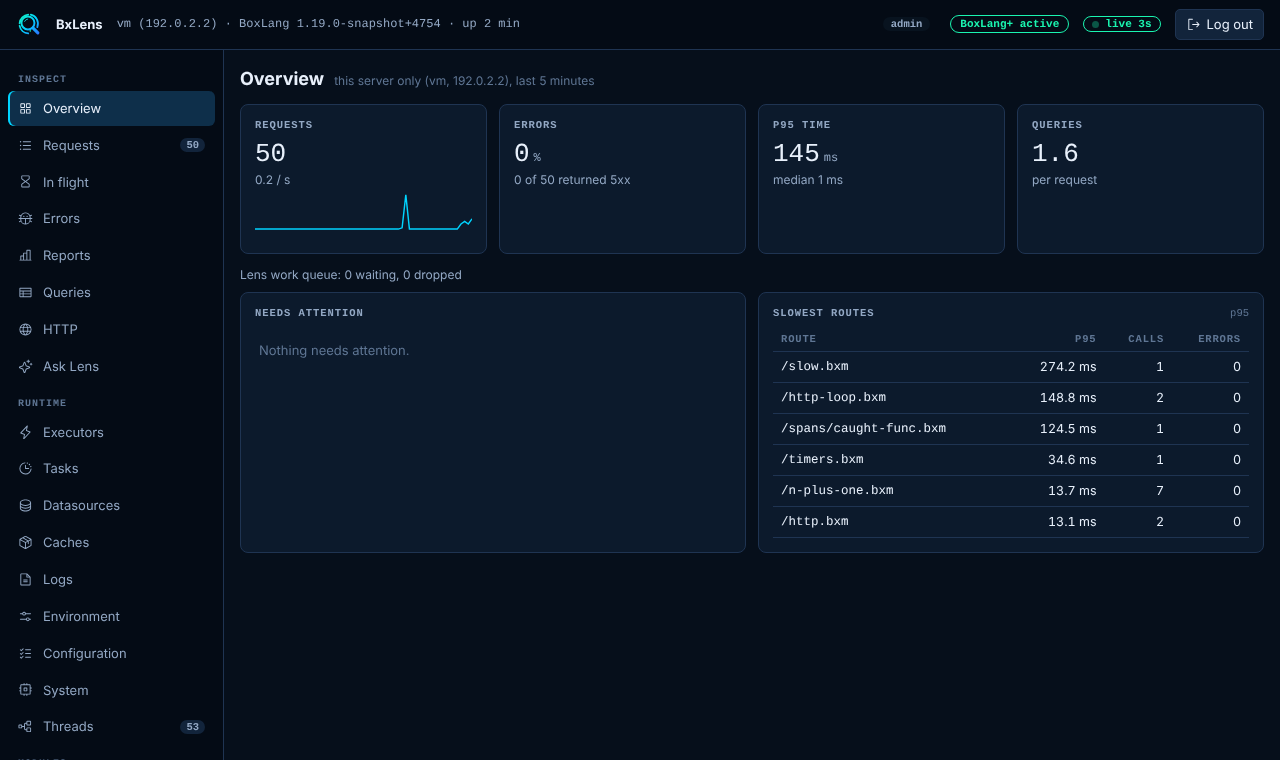
The first time you open the console it asks you to set the admin password right there, and stores it hashed. Secrets such as API keys live in an encrypted Secret Store, never in plain text.
Lensy, the Box Agent for your server
Ask in plain words: what got slow after the deploy? Lensy reads the same data you see, explains it, and can act on your server after you approve each step. It runs on BoxLang AI and can use your own MCP servers.
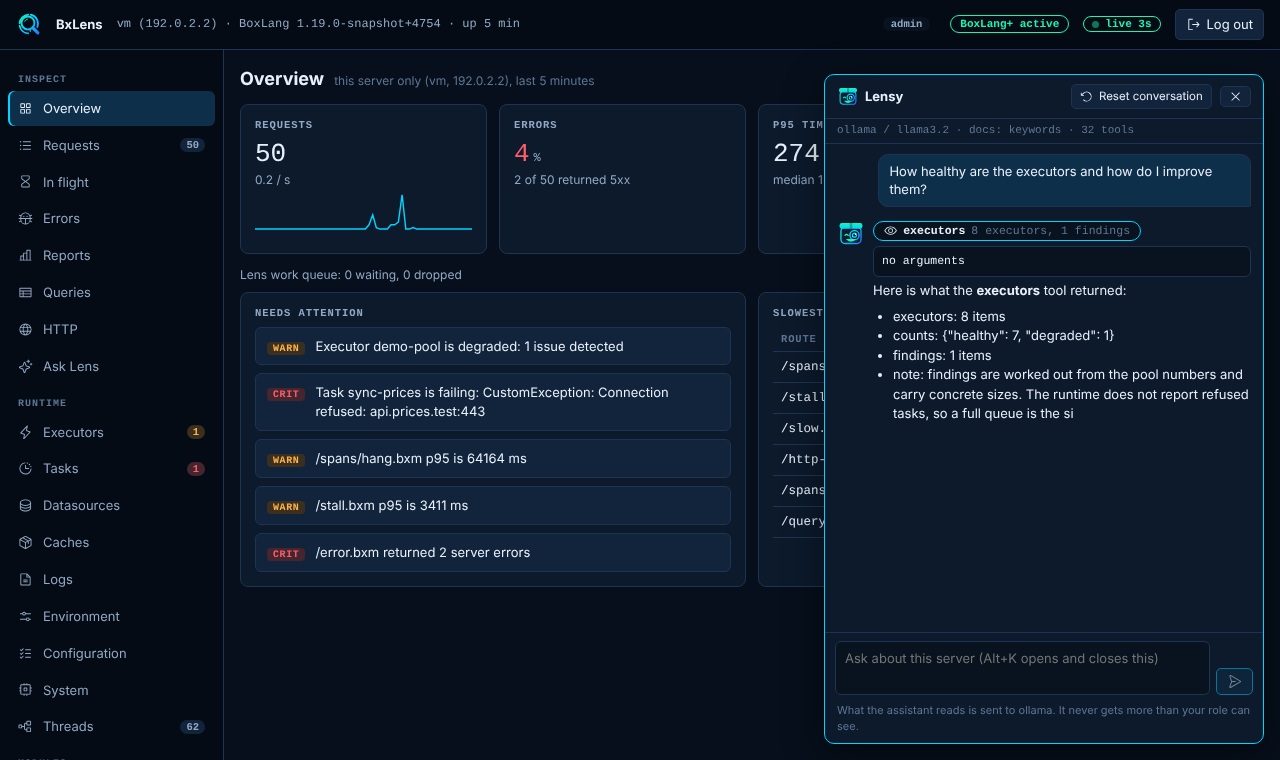
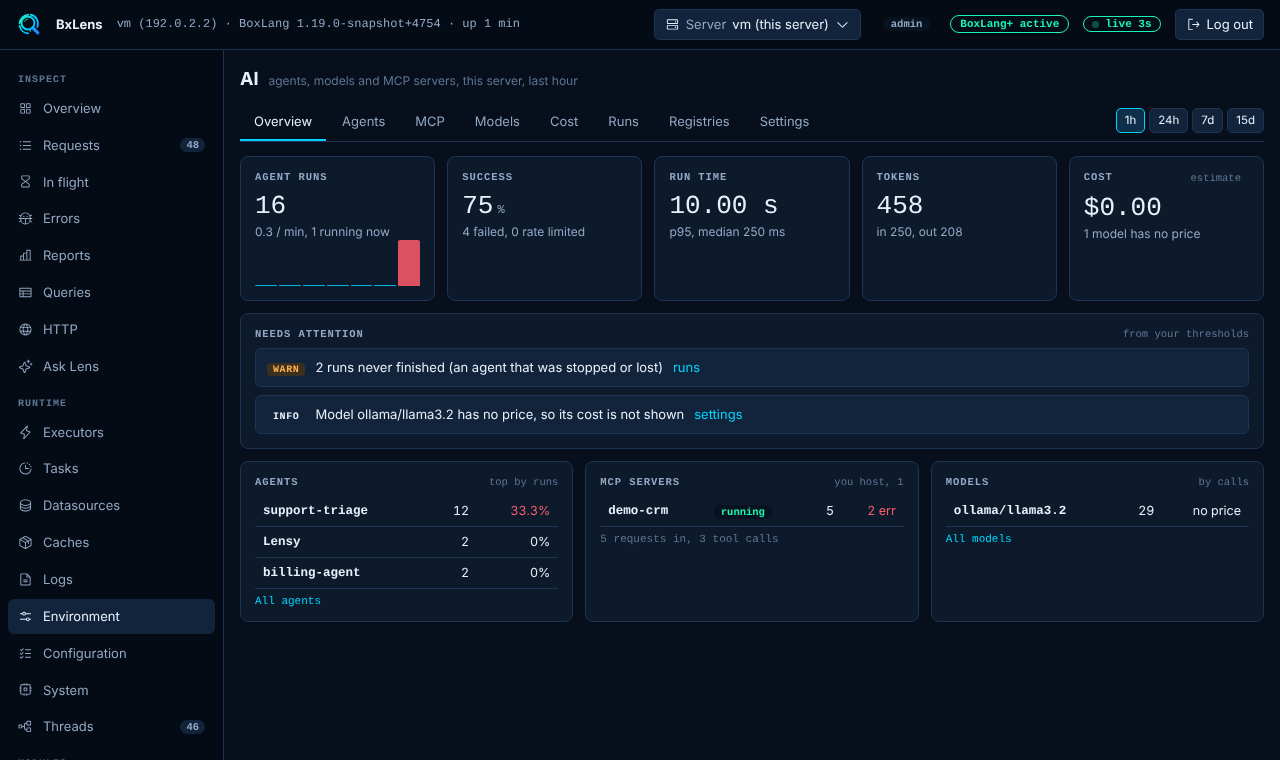
AI observability for BoxLang AI agents, models and MCP servers
BxLens is the LLM and AI agent observability for
BoxLang. It traces every BoxLang AI (bx-ai) run with no
code change: agents, tool calls, MCP servers, models, tokens,
estimated cost, rate limits and errors, with a step by step
trace of each run, how each agent is composed, and a failing tool
called out by name.
- Runs and traces: every agent run, nested sub-agents, model calls with their retries, tool and MCP calls, in one timeline.
- Tokens and cost: input and output tokens per model and agent, and cost from prices you enter.
- MCP servers: the ones you host, with calls, errors and what to check when they fail.
- Needs attention: failing agents, rate limits, MCP errors and slow runs, against thresholds you set.
- Private: prompts and answers are not stored unless you turn content capture on, and then they are redacted.
The full pages are part of BoxLang+ (the 14 day trial covers them). Free shows the run counters for the last hour.
Know before your users do
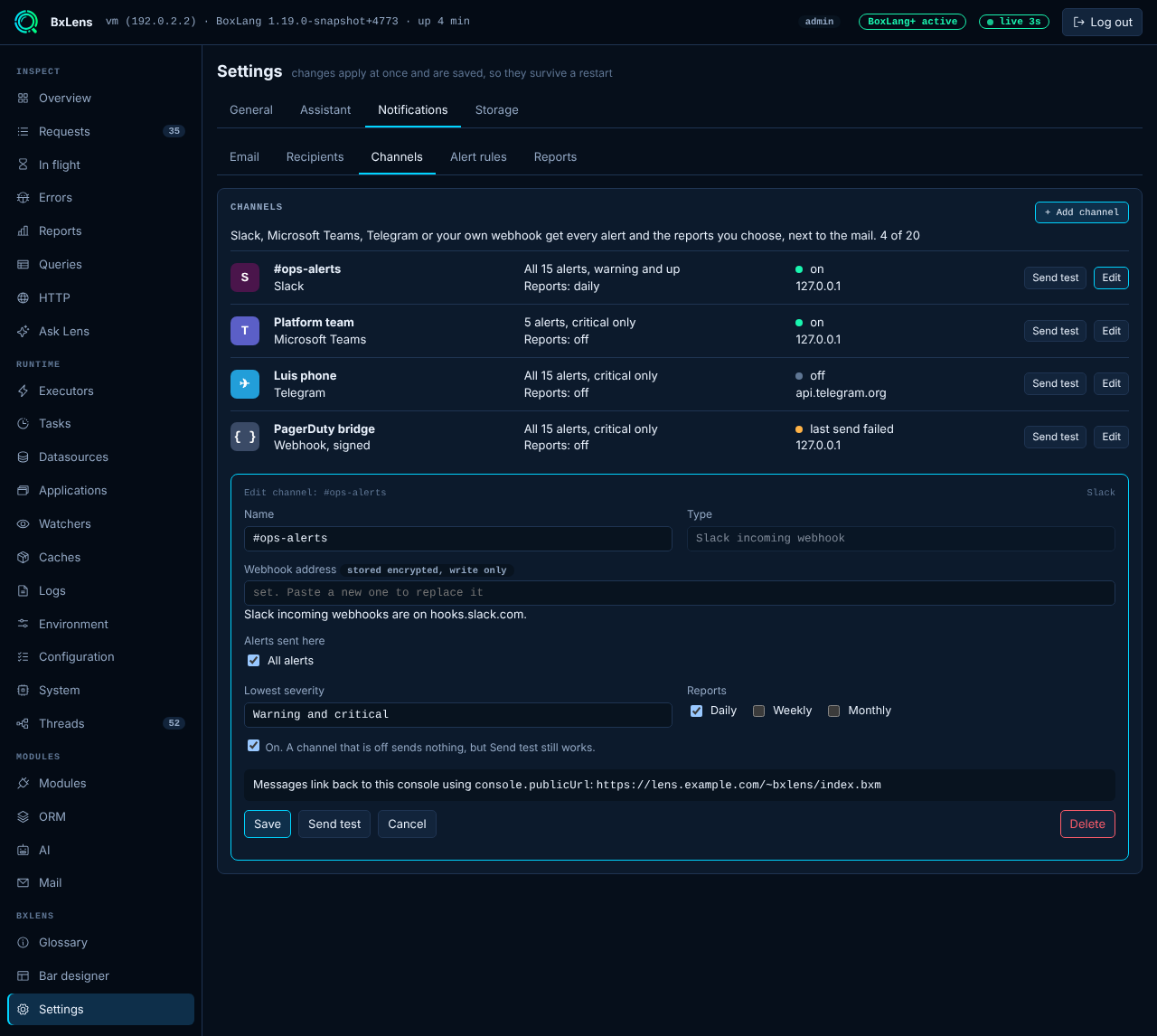
- Alerts by email and to Slack, Microsoft Teams, Telegram or a signed webhook, with 15 rules from a deadlock to a datasource pool that ran dry.
- Daily, weekly and monthly reports for your team.
- Mail: see every message bx-mail sends, with a safe preview, the delivery attempts and the queue.
- Many servers: one console for the fleet, with the pages of every server and shared volumes.
Private and safe by design
Everything is collected in memory by Java code inside your server. Passwords and keys are redacted from what you see, the console has an admin and a read only role, an audit log, and a read only mode. A server with no console password stays locked until you set one. See Security and the privacy notice.
Free, with BoxLang+ when you need more
BxLens is free for one server, in production too. BoxLang+ lifts the limits and adds history, actions, many servers, alerts and AI. Registering a server for the console is free and starts a 14 day trial of BoxLang+.
| Free | BoxLang+ | |
|---|---|---|
| The bar, every tab | Yes | Yes, plus request cost |
| Console: requests, executors, datasources, logs, environment | Yes (free registration) | Yes |
| Errors and reports | Last hour, in memory | Saved to disk, up to 15 days |
| Task, cache and heap dump actions, log download | No | Yes |
| Alerts, reports and channels | No | Yes |
| Lensy and AI observability | No | Yes |
| Many servers in one console | No | Yes |
Compare everything in Free and BoxLang+.
Requirements
BoxLang 1.19 or newer, Java 21, and MiniServer, CommandBox or a servlet container.
Documentation
Everything is at bxlens.boxlang.io: Getting started, the console, configuration, the BIFs, extending BxLens and running it in production.
Support and feedback
Bug reports and ideas are welcome at BLMODULES.
License
BxLens is a product of Ortus Solutions, Corp. License terms apply, see the BoxLang+ plans page and Licensing. Phosphor Icons are MIT licensed.
Ortus Sponsors
BoxLang is a professional open-source project and it is completely funded by the community and Ortus Solutions, Corp. Ortus Patreons get many benefits like a cfcasts account, a FORGEBOX Pro account and so much more. If you are interested in becoming a sponsor, please visit our patronage page: https://patreon.com/ortussolutions
THE DAILY BREAD
"I am the way, and the truth, and the life; no one comes to the Father, but by me (JESUS)" Jn 14:1-12
Changelog
All notable changes to this project will be documented in this file.
The format is based on Keep a Changelog, and this project adheres to Semantic Versioning.
[Unreleased]
Changed
- Settings is a hub. The page opens on an Overview of area cards (Lens bar, Collection, Thresholds and checks, Fleet limits, Notifications, Assistant, Storage, Security and access, Console server) with a list of areas on the left, or a list and a full screen area on a phone. Search finds any of the 128 settings and edits it in place, Essentials and All hide the advanced rows, and a dot marks a value changed in the console. Collectors are switches you press, degraded and critical limits share one row with a zone bar, and nothing scrolls sideways on a phone.
GET settingsgives each setting anarea,section,adv,unit,title,hint(andoption,subsection,pairwhere they apply) and the list ofareas. - Settings save as you go. A switch, choice or pill saves when pressed, a number or field when you press Enter or leave it, a refused value shows on its row and goes back, and a note offers Undo for six seconds. The Apply and save bar is gone. The password forms, adding a person, channel or MCP server, the mail server settings and the Assistant's model card (Save the model) stay explicit. Notifications is drawn as rows and cards in all six tabs.
- Notifications, Assistant, Storage and Security are drawn in the hub. Rows and cards like the other areas: a usage bar and a list of servers in Storage, the model, behaviour and MCP servers as rows in the Assistant, password and secret rows in Security, and the Notifications forms in hub cards with tabs that scroll on a phone. Nothing sideways on a phone. The save behaviour and every route are unchanged.
- The main menu collapses to its icons. A toggle at the top of the console menu shrinks it to icons with a tooltip on each; the choice is kept in the browser.
- The console is built from small files. Its sources are split per page under
src/main/bx/consoleand joined at build time; the script and stylesheet are minified (about 26 percent and 14 percent smaller). Pages are built when their tab opens, so the console starts with a fraction of the DOM, and a thin neon bar runs while a page loads. The debug bar is unchanged. The build needs node for the minifier (-PskipMinify=trueskips it).
Added
- The Overview is the fleet. It shows the state of the whole fleet (healthy, degraded, critical, silent, gone), fleet totals with the worst server named, the fleet as a table or cards (kept per browser), and the slowest requests, SQL, outgoing HTTP calls, MCP servers and AI agents across the servers, with a legend of the limits and a Customize button. With one server it is the same page with one row. Routes
GET overview/fleetandGET overview/reports, see Overview. - Groups, kinds and versions. New settings
server.groupandserver.kind(environmentLENS_SERVER_GROUPandLENS_SERVER_KIND). The fleet is sorted and filtered by group. Each server has an icon for what it runs in (a host, Docker, Kubernetes, Podman, LXC, AWS Lambda, ECS, Cloud Run, Azure; Docker Swarm is set by hand), and shows its BoxLang and Java version, with the servers that differ marked. The identity of every server, ininstance.jsonand theserverblock of each snapshot, now carriesgroup,kind,kindLabel,icon,ephemeral,kindDetail,boxlang,javaandbxlens. - Gone servers. A server that has not saved its health for 15 minutes leaves the fleet and moves to a Gone tab, which suits containers that come and go. An admin can Forget a gone server (BoxLang+, typed id, audited as
server.forget). - Limits you can change. New live settings
fleet.heapWarn,fleet.heapCrit,fleet.cpuWarn,fleet.cpuCrit,fleet.errorWarn,fleet.silentSecandfleet.goneMin, with the volume limitsvolumes.warnPctandvolumes.critPct, in a Fleet card in Settings. A warn value at or above its critical value is refused. - Free sees this server on the Overview and a blurred count of the other servers found in the store folder, with an upgrade card. Nothing about those servers is read or sent.
- The saved report of each server (
reports.json) now carries the latency counts of its URLs, so the slowest route of a fleet has a real p95.
Fixed
-
The version badge no longer reads the console state before it is loaded.
-
The BxLens version is shown as a badge in the console header and next to the title of the Settings page (for example
v1.0.0-snapshot). The hover text has the full version with the build number. It comes from the module version that the build writes, so there is nothing to set. -
Threads (JVM > Threads) show who blocks whom (
blockedBy,waitingOn, held locks, daemon, CPU use now from a bounded sampler, a stack key), blocked chains under their root holder, groups of threads with the same stack, a pool summary with busy percent, and up to five in-memory snapshots to compare for likely stuck threads (POST threads/snapshot,GET threads/snapshots,GET threads/compare). The JVM page also givesattention(from the findings, which stay) andthreads.pools. -
System is now the machine under BoxLang: type (physical, virtual machine, container) with the cloud and instance type from the DMI texts, operating system, kernel, CPU model and count, memory and swap, container and Kubernetes names, container CPU and memory limits (cgroup v1 and v2), machine and BoxLang uptime, live CPU, load, memory, swap, disk I/O, network, open files and CPU throttling, and 15 minutes of history from a small bounded sampler. What an operating system cannot report is null and listed in
unsupported. No external process is started. The oldsystemkeys stay. -
System storage shows the folders that matter (logs, the BxLens store, the BoxLang home, temp and the working directory) with their volume and status, and every other mount under "other", with kernel and in-memory file systems listed there only.
-
Environment has highlights (runtime, container, Java, heap max, time zone), one list of variables, JVM arguments and system properties with a source, a hidden flag and a JDK noise flag per row, and counts. The older keys stay for the diagnostic bundle.
-
One runtime detector (MiniServer, CommandBox, servlet container, command line) shared by the System, Environment and Web server pages.
-
System detail for the tabs CPU, Memory, Disks, Network and Processes: per core CPU with frequency, temperature, context switches and interrupts, memory with cache, available, swap in and out and page faults, disks (kind, mounts, busy, read and write, queue), network interfaces (speed, state, in, out, errors, drops), TCP counts and retransmissions, DNS servers and gateway, the top 20 processes by CPU and by memory (names only, never a command line; open files and disk I/O where the system allows), one hour of history, and a shared "Needs attention" list (full locations, load, low memory, swapping, container throttling, a pinned core, a hot process, a saturated disk, interface errors, TIME_WAIT). Linux reads
/procand/sys; macOS and Windows use the bundled OSHI library through one bridge class, restricted to calls that start no external process. What a system cannot give is null and listed inunsupported. The health snapshot keeps the old keys, the attention list and 15 minutes of history, without the process list and the per core readings. -
First Release
-
MCP rate limits in AI observability (needs bx-ai 3.7 or later on the hosted servers). The MCP page and the page of each hosted server show the rate limit: a Rate limited tile and column, a Rate limit card (limits, blocked, store errors, history kept, trusted proxies), Top consumers for today, 7 days, 30 days and all time, a sample of recent hits, and hints. Clients are an IP or a short hash, never a key.
-
An admin can pause or resume a hosted MCP server, turn its rate limit off or on, reset the counters and clear the stats from its page (BoxLang+, refused when the console is read only, audited as
ai.mcp.host). -
Two alert rules,
MCP rate limitedandMCP rate limiter failing(17 rules now), that can be switched on and off alone. The AI rule no longer sends those items. New settingcollectors.aiobs.mcpRateLimited(30 blocked calls in 10 minutes). -
The daily, weekly and monthly reports have an MCP rate limits section: calls and blocked calls per MCP server and the top clients.
-
Free gets a fourth counter, MCP calls blocked, and a locked preview.
-
JVM page (Runtime, after System): heap and every memory pool, garbage collection from a bounded ring of the last 100 collections with cause notes, time in GC, allocation rate, threads by state, classes and JIT, buffers, open files, JVM flags with plain suggestions, a "Needs a look" box and a 15 minute history. Threads moved into it as a tab. New route
jvm, collectorjvm, health snapshot partjvm, andjvm.jsonin the diagnostic bundle. -
Web server page (Runtime, admin only): the runtime (MiniServer, CommandBox or a servlet container), listeners, workers, request counters, findings and a 15 minute history, read only from what the server reports.
collectors.webserver.enabled, routewebserver, also in the health snapshot for other servers. Seedocs/reference/web-server-data.md.
-
Ortus Solutions
- Published
-

Minimum Version: 1.19.0 -
1.0.0-snapshot is the latest of 1 release(s)
Published
- Published on {{ getFullDate("2026-10-26T18:06:48-05:00") }}
-
-
 BoxLang+ Proprietary (free tier with limits)

Use It
								$
									box install bx-lens
Collaborators 0
Stats
- {{ getFullDate("2026-10-15T15:36:42-05:00") }}
- {{ getFullDate("2026-10-26T18:06:48-05:00") }}
- 137
- 65